Setup PhantomGuard CDN with GoDaddy
This guide explains how to point your GoDaddy domain to PhantomGuard using custom nameservers.
PhantomGuard nameservers:
-
casper.phantomguard.io
-
myrtle.phantomguard.io
Prerequirements:
- PhantomGuard is already installed in your WordPress website.
- PhantomGuard license has already been set up.
-
Sign in to your GoDaddy Domain Portfolio.
-
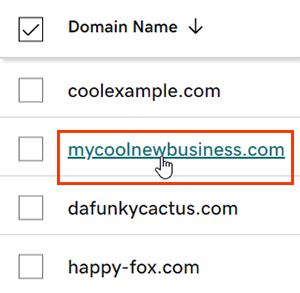
Select an individual domain to access the Domain Settings page.
- Select DNS and then select Nameservers.
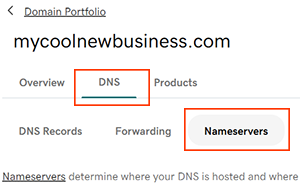
- Choose the I'll use my own nameservers option and enter the following name servers.
- casper.phantomguard.io
- myrtle.phantomguard.io
- Select Save and then Continue to complete your updates.
Domains with Domain Protection require additional identity verification. If you've had 2-step verification (2SV) turned on for at least 24 hours, enter the code we sent via SMS, or enter the code from your authenticator app. Otherwise, enter the one-time password we sent to the email address on your GoDaddy account.
Most DNS updates take effect within an hour, but could take up to 48 hours to update globally.