Setup PhantomGuard CDN with Hostinger
This guide explains how to point your Hostinger domain to PhantomGuard using custom nameservers.
PhantomGuard nameservers:
-
casper.phantomguard.io
-
myrtle.phantomguard.io
Prerequirements:
- PhantomGuard is already installed in your WordPress website.
- PhantomGuard license has already been set up.
- Sign in to hPanel at https://auth.hostinger.com/login
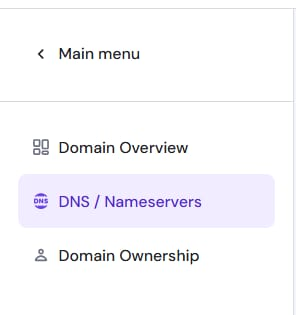
- Navigate to the Domains section on your hPanel, and click on Manage next to the domain that you want to update. Select on DNS/Nameservers on the sidebar.
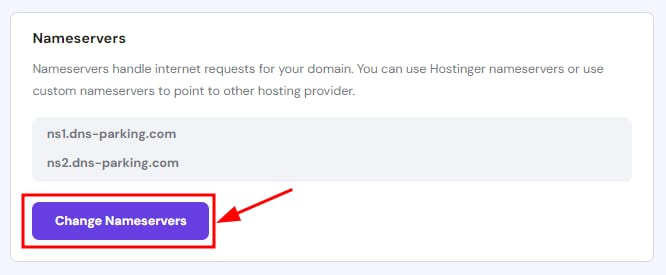
And click on Change Nameservers
Tick Change Nameservers
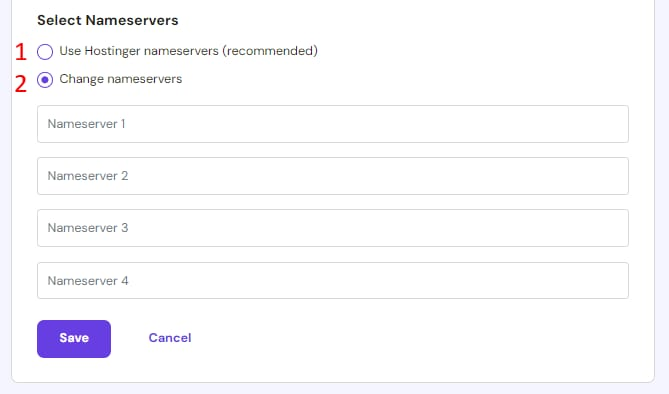
- Enter the nameservers:
-
casper.phantomguard.io
-
myrtle.phantomguard.io
You can leave the Nameserver 3 and Nameserver 4 fields empty.
- Once ready, click on Save.
Most DNS updates take effect within an hour, but could take up to 48 hours to update globally.